Desktop Dashboard · Windows · $5.99 once

Close the tabs.
Open DayFrame.

Seven apps open just to know what's happening today. DayFrame replaces them with one quiet window on your desktop: email, calendar, markets, weather, notes, and reminders, all in one place, all on your machine.

No AI, ever Data stays on your machine No subscription Arrange it your way
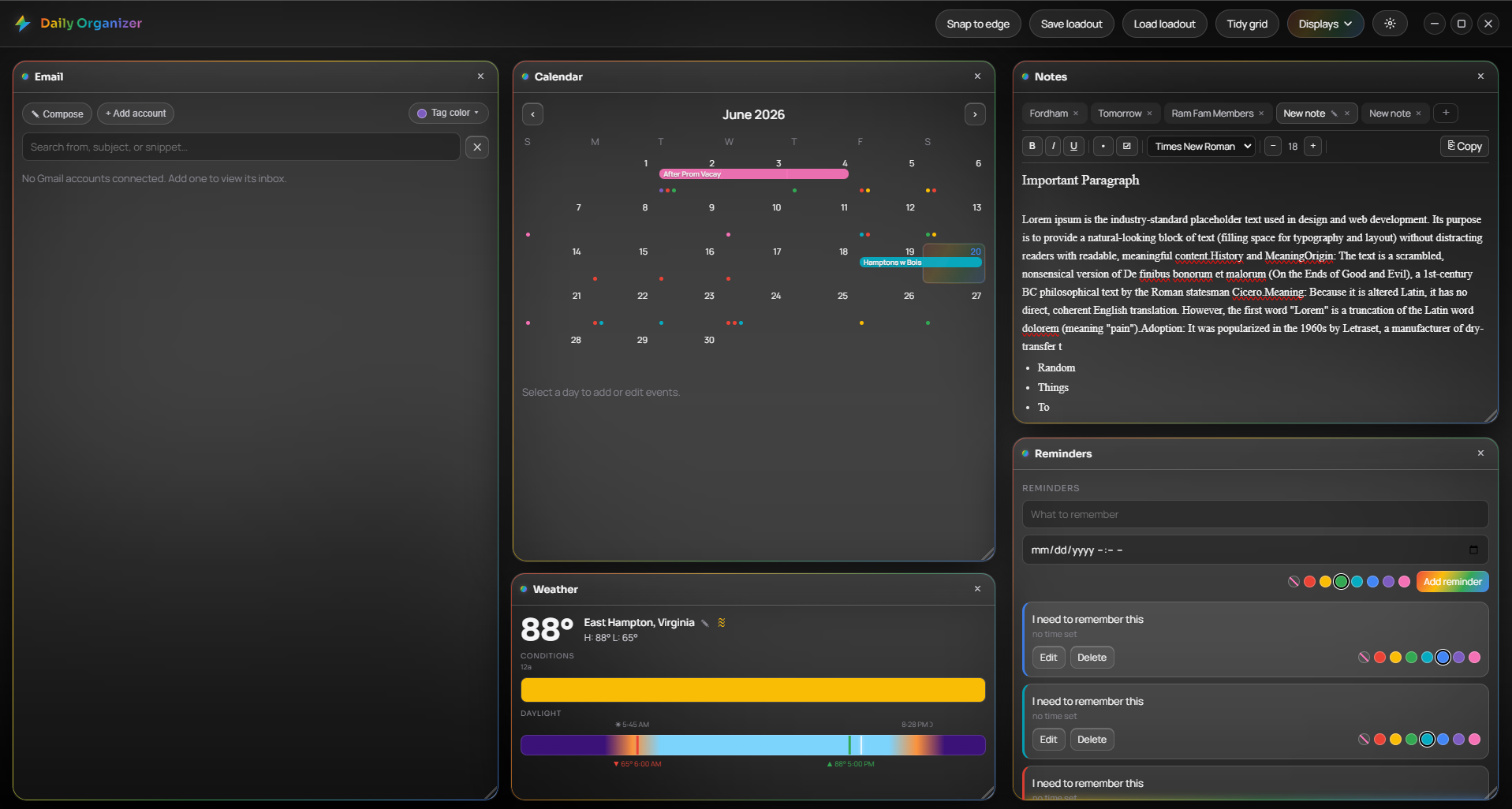
DayFrame showing email, calendar, notes and weather

Email not logged in on this screenshot. Connect your Gmail and you can color-code messages, tag them by sender, and save annotated PNG copies to disk.

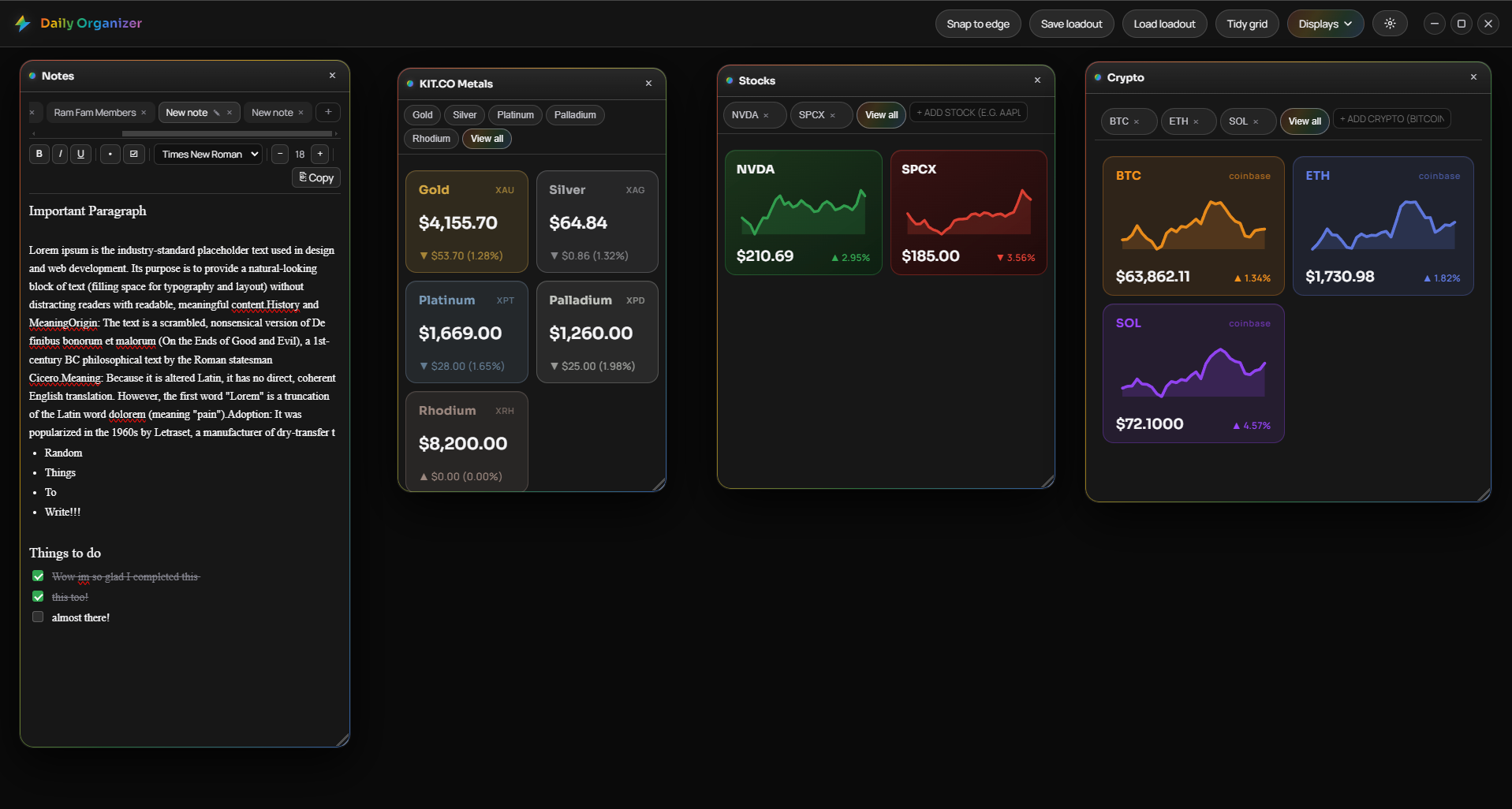
DayFrame showing stocks, crypto, metals and notes panels

Who DayFrame is for

If you keep six browser tabs open all day just to check your inbox, your calendar, and the market, if you've turned down every "enable AI insights" prompt, if you want your computer to feel like a tool again instead of a product:

DayFrame was built for you.

What it does

Everything in its place.
Nothing in your way.

Each panel does one thing well. Open what you need, hide what you don't, and arrange the rest however you like.

📬

Email, without the browser

Connect multiple Gmail accounts. Read, reply, compose, label, and trash messages right here. Color-code by sender, tag threads, and export annotated PNG copies. No browser tab required.

📅

Calendar that's always visible

Click any day to add an event. Color-code it, set it to repeat, give it a time. Your schedule sits right next to your inbox and your markets, always in view.

🔔

Reminders that actually fire

Native OS notifications at exactly the time you set. No browser open, no background tab, no app to check. Set it and move on.

📝

Notes that don't go anywhere

A scratchpad that auto-saves and persists across restarts. Formatted text, checklists, multiple notebooks. Stored locally. Not read by anyone else.

🌤

Weather at a glance

Current conditions and a day-by-day forecast for any city, always visible in your dashboard. One less reason to open a new tab before you head out.

📋

Agenda: what's next

A chronological view of your upcoming days, events and reminders listed together in order. See everything coming up without scrolling a full calendar.
Live market data

Know where
things stand.

Stocks, crypto, and precious metals on your desktop, always current. No browser tab to open, no app to switch to.

📈
Stocks
Type any ticker. Live price and daily change appear instantly. AAPL, TSLA, SPY, or whatever you track.
Crypto
Search any coin by name or symbol. BTC, ETH, SOL and thousands more, updated in real time.
🥇
Metals, via Kitco
Spot prices for gold, silver, platinum, and palladium. If you hold hard assets, they belong on your dashboard.
DayFrame finance panels showing Stocks, Crypto and Metals

Sample data. Live prices update automatically.

Build it your way

11 displays.
Your arrangement. Your call.

Enable what you need, hide what you don't. Drag panels anywhere, resize from any corner. DayFrame remembers exactly how you left it.

📬
Email
Gmail inbox, multi-account, color-coded tags, PNG export
📅
Calendar
Monthly view with events and recurring entries
🔔
Reminders
Native OS push notifications at your chosen time
📋
Agenda
Upcoming events and reminders in chronological order
📝
Notes
Auto-saving scratchpad with multiple notebooks
🌤
Weather
Current conditions and multi-day forecast
📈
Stocks
Live quotes for any ticker symbol
Crypto
Real-time prices for any coin
🥇
Metals
Gold, silver, platinum, and palladium spot prices
🔖
Bookmarks
Quick-access links, always a click away
🔵
Bluetooth
Nearby device management from your dashboard

Privacy

We don't want
your data.

Every other dashboard app is looking for an angle: a subscription tier, an AI upsell, an "insights" feature that means they read your calendar. DayFrame has no server to send your data to, no account to create, and no business model that depends on knowing what you do. It's software. You buy it, it runs on your machine, that's it.

  • Layout, events, reminders, and tokens all stored locally
  • Gmail connects directly to Google. We never see a single email.
  • No account required. Open the app, it works.
  • No analytics, crash reports, or usage tracking
  • No AI. No machine learning. No "smart" anything.
0
external servers
your data touches
No AI
No machine learning.
No smart suggestions.
Just your data.

Pay once.
Own it forever.

Most software is rented now. DayFrame is bought. One price, no renewal, nothing locked behind a tier.

$5.99
One-time · Yours forever
Windows · Electron One-time payment Local-first